What is DNS over HTTPS (DoH)? The Internet's Secret Guide
Greetings! Today we're exploring DNS over HTTPS (DoH), which protects one of the most critical lines of defense for our internet privacy: the point where our digital footprints begin.
Every action we take on the internet leaves a trace, but the biggest trace is usually at the most fundamental point: our "address book." We use HTTPS to encrypt our traffic, but what about that first step where we tell the site we want to visit? DoH takes our privacy to the next level by placing this first step inside a "black box."
Let's delve into the inner workings of this technology together.
1. The Fundamental Problem: Why is Traditional DNS Insecure?
DNS (Domain Name System) is the internet's phone book. When you type google.com into your browser, your computer asks a DNS server, "What is the IP address of this site?"
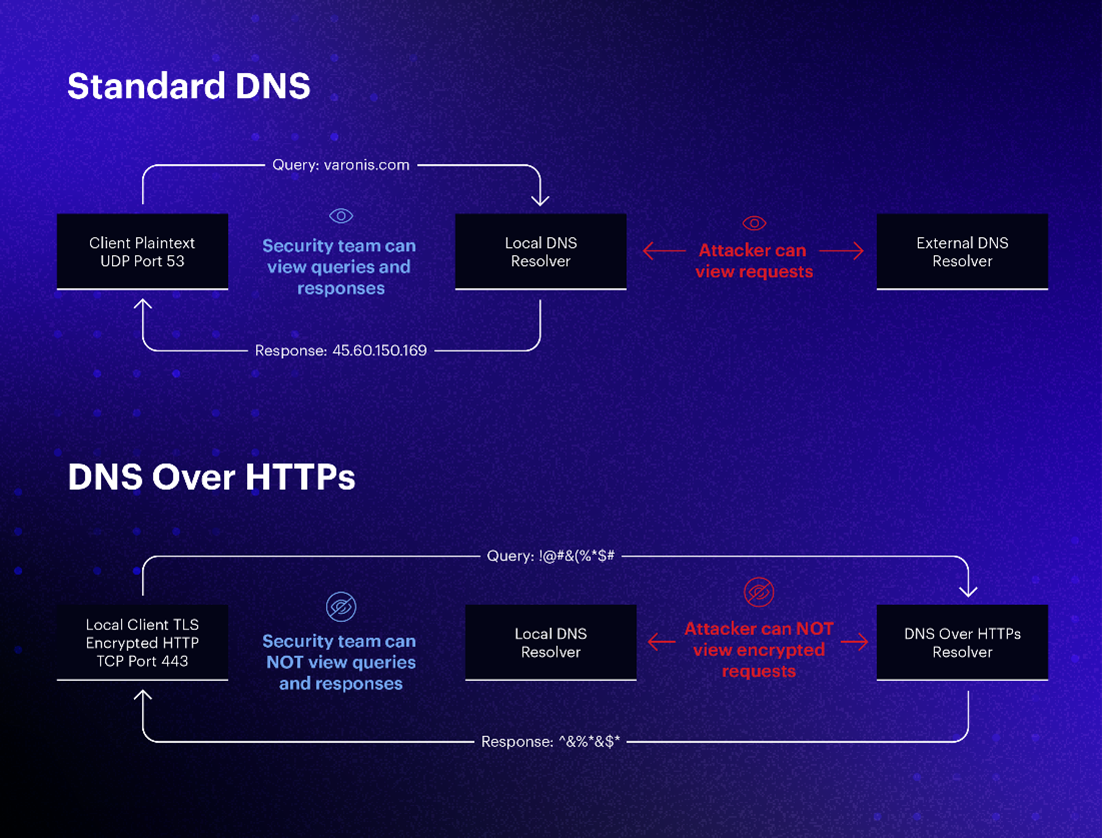
Traditional DNS queries (over Port 53) have some serious vulnerabilities:
- Plain Text: Your queries are not encrypted. Anyone on the network can read what you are searching for.
- Traceability: Your Internet Service Provider (ISP) can see and record which sites you are trying to access in real time.
- Interference (DNS Hijacking): Malicious actors can alter your query en route and redirect you to a fake site.
2. What is DNS over HTTPS (DoH)?
DNS over HTTPS is a technology that encrypts your DNS queries by hiding them within the HTTPS (Port 443) protocol, making them appear as standard web traffic.
This way, your DNS query takes on the same packet structure as a normal web page visit. An outside observer cannot technically see which domain name you are querying; they would only notice that encrypted HTTPS traffic is flowing. So your "address request" process gets lost in the crowd.
3. How Does DoH Work? (Step-by-Step Process)
I can summarize the working principle of DoH with the following technical steps:
- Query Preparation: When you want to go to an address, your browser captures this request.
- HTTPS Tunnel: Instead of sending the DNS query as plain text, the browser sends it over a secure HTTPS connection to a DNS server that supports DoH (Cloudflare, Google, etc.).
- Encryption: The data is completely encrypted on the way. Your ISP only sees the "encrypted data"; it cannot read the content (the site you are going to).
- Decryption: The DNS server decrypts the encrypted packet, finds the IP address, and sends it back to the browser after re-encrypting it.
4. Why Should We Use DoH?
There are three main advantages to using DoH:
- Privacy: It makes it impossible for your ISP or local network administrator to keep a record of which sites you try to access.
- Security: It prevents interception attacks. You ensure that the data is not corrupted en route.
- Overcoming Restrictions: It helps you overcome DNS-based blocks implemented on some networks, because the traffic looks like standard web traffic and is indistinguishable.
5. DoH vs. DoT (DNS over TLS)
Both technologies offer encryption, but their approaches differ:
- DoT (DNS over TLS): Uses a separate port (853). Network administrators can easily recognize and block this as DNS traffic.
- DoH (DNS over HTTPS): Uses the standard web port (443). Because it mixes with other web traffic, it is technically much more difficult to block.
6. How to Activate?
Most modern browsers (Chrome, Firefox, Edge) have this feature built-in:
- Go to your browser settings.
- Find the Privacy and Security section.
- Activate the Use Secure DNS option.
- Start your privacy by choosing a trusted provider (e.g., Cloudflare 1.1.1.1).
Conclusion
Internet privacy begins not only with the applications we use, but also with the protocols in the infrastructure. DoH closes one of the oldest and most open gaps in the internet, offering us a more secure browsing experience. Although it poses challenges for those who want to monitor network traffic, DoH is now an indispensable standard for individual privacy.
Bu Yazıyı Beğendiniz Mi?
Yazara destek olmak için karta dokunun
Comments
0